Cocast is a small AI podcast app. You tell it what you are curious about, it pitches bite-sized podcast topics, and generates the ones you keep. Everything it produces depends on how well it understands what the user actually wants to hear.
Until this month, onboarding was a grid of ten topics. You tapped a few and moved on. It worked, and it gave the app little substance to start with.
Three things have changed that make a voice-first onboarding practical. Synthetic voices are now pleasant to listen to. Low latency makes the dialogue feel natural. And the reasoning model can call functions in my app while it talks. Put those together and a conversation can fill in a database for greater personalisation later on. No user would ever want to type in that much information.
Traditional vs voice-first onboarding
The amount of information each one collects is not comparable.
Before: taps
After: deep context from a brief conversation
2 interests, 8 angles, 1 schedule, 1 listener summary from 3 min 36 s of talking.
The quantity of information, nuance and context you can get from a casual conversation is far richer than a few taps in a deterministic onboarding. A grid records which of ten boxes were ticked. Three and a half minutes of talking produced eight distinct angles across two subjects, each with a sentence of detail, plus a summary of how the listener likes things explained.
The voice-first onboarding in action
I've tested it multiple times, and I'm very impressed by the quality of the dialogue, the low latency of the answers, the follow-up questions it asked and how it handled being interrupted.
The voice agent runs on ElevenLabs, with its v4 Turbo voice model. It can call functions in the app, such as save_interest, set_schedule and finish_onboarding. The conversation is open-ended, and the app stays deterministic. The model can only write data through specific, predefined paths.
A voice, not a face
I recently went through a SaaS onboarding led by a generated human on video. It asked how my day was going, and frankly I was pissed that it wouldn't move on until I had told a rendering about my day. I'm not convinced this is the future.
But conversation between people leans on what we see. We watch a face to know whether the other person is listening, about to speak, or thinking. Remove every cue and people talk over each other, or sit in silence wondering whether they were heard. So the orb I designed gives users subtle visual cues. Its design was inspired by the MIT-licensed AI-Orb project.
Idle
Waiting. One cloud of colour rests low in the glass and breathes slowly.
Listening
Your turn. The colour lifts and holds still, like a held breath. Your voice shows as light moving in from the rim.
Thinking
Working, usually on a save. The colour circles the glass.
Speaking
Its turn. The colour centres, and each swell of its voice drifts out toward the rim.
Visual feedback as onboarding progresses
It's also important to show users that they're not talking into the void, and that the conversation is being translated into concrete onboarding steps. In Cocast, each saved interest appears as a card at the bottom of the screen.
The second cue is ordinary UI. When the agent saves an interest, a card slides in with an emoji, a label and tags. The user can check at a glance that the voice assistant understood everything correctly.
Everything else I took out. Onboarding should go one way, with one obvious next step. So there are no captions, no text field, no mute button and nothing to edit by hand. You move forward by speaking. If the microphone is refused, the old tap flow takes over.
The workflow and AI stack
During the conversation, on every turn
- WebRTCMy microphone, through the ElevenLabs React SDK
- Scribe v2 RealtimeSpeech to text
- turn_v3 · patientDecides I have finished talking
- deepseek-v41-flashWrites the reply and calls the five functions
- client toolsA called function runs in my page and saves through the app's API
- eleven_v4_turboThe voice, in expressive mode
After the conversation
- interests.detailsSaved angles, in Postgres
- gemini-3.8-flashWrites the pitches I keep or skip
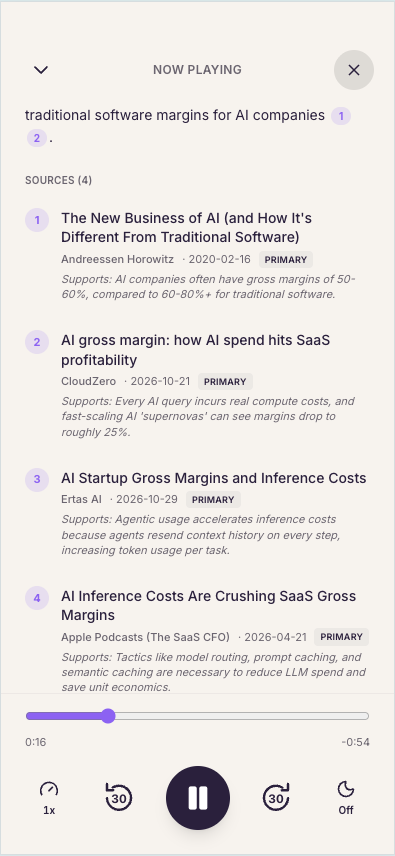
- gemini-3.1-pro-previewResearches with Google Search and writes a two-host script with numbered sources
- eleven_v4 · Text to DialogueVoices both hosts together, so they react to each other
- MP3 · 128 kbpsThe episode in my feed
Fine-tuning the agent
Testing the onboarding led to some fine-tuning of the agent's instructions. For example, I gave it further instructions on the types of follow-up questions to ask, and on how to recap the onboarding at the end without repeating everything the user said. Overall, I was surprised by how well it performed the first time, and by how easy it was to fine-tune the ElevenLabs agent's instructions once it was connected to my Claude session.
The final podcasts
Once the user completes onboarding, a Gemini Flash model pitches bite-sized podcast topics. The user can fine-tune their interests by liking or disliking pitches, and accepted pitches go into the queue for daily podcast generation. Gemini Pro writes each script, with search grounding from credible sources.
Here again, ElevenLabs' lively voices generate the podcast audio.
My feed, 13 November
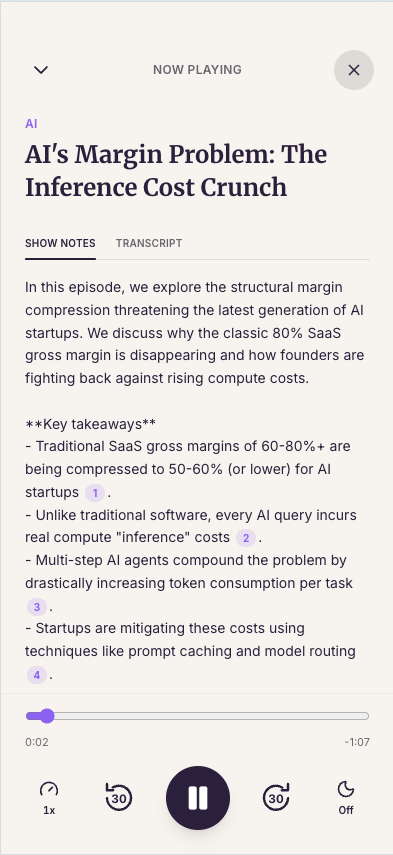
Show notes and sources, from the app
What a session costs
My five complete test sessions lasted about four minutes each and cost $0.37 on average. ElevenLabs bills two things. The voice platform costs 8 cents a minute on my plan and covers speech-to-text, turn-taking and text-to-speech together, so the bill does not separate them. That is $0.33 of the average session. The language model, the brain of the agent, adds $0.04.
Cost of an average onboarding session
- $0.33 · 88%Voice platform: speech-to-text, turn-taking and text-to-speech, billed per minute
- $0.04 · 12%Language model
Where the minutes go: session of 13 Nov, 10:34
- Cocast speaking, text-to-speech: 113 s
- me speaking, speech-to-text: 93 s
- pauses: 10 s
Inside that per-minute fee, the session replayed above breaks down like this. Cocast spoke for 113 seconds, which is 1,858 characters of text-to-speech. I spoke for 93 seconds of speech-to-text, and 10 seconds were pauses. The language model read about 89,000 tokens, nearly all of them the cached instructions it re-reads at every turn, and wrote fewer than 2,000.
My conclusions
- Use voice to collect context, and keep the app deterministic. The agent's whole power over my product is five functions.
- Give the conversation a body, not a face. People need to see whose turn it is. They do not need a fake person.
- Confirm with ordinary UI, as it happens. A card that appears while you are still talking is worth more than a summary screen at the end.
- Take the controls away. One direction, one next step, and voice as the only way forward.
- Read the transcripts. Every improvement here, and every problem I still have, came from reading what was actually said.
- Check the unit economics. At about 37 cents per onboarding, voice is likely still a bit too expensive to put in production for a free app.